AMT to GL Reconciliation Report
To run this report, navigate to System Administration > Data Translation and Validation > AMT to GL Reconciliation.
By default, this report only examines work order settlement costs, and equipment billings (for equipment under a maintenance contract). With respect to work order settlement costs, only costs for the default cost bearer can be reconciled.
The Date fields in this report correspond to calendar dates. If the financial periods set up in AMT are different to calendar periods, AMT will automatically translate the calendar period to the correct financial period.
Work order settlement records that have a Job Date, and Billing records that have an Invoice Date within the Start and End Dates selected will be reported.
You can analyse the costs in the report by Sell or Cost (this distinction is relevant for maintenance contract equipment). For non-maintenance contract equipment, both Sell and Cost will actually reflect the same value.
You can also select AMT Equipment: Yes, No or All. If you select Yes, transactions not linked to an AMT equipment will be included in the report.
An example of the report is below, followed by a description of the major sections. To drill down into any of the areas on the report, click on the corresponding link to see the details.
There is no data in the example screenshot.
The report's header page provides a summary of the reconciliation equipment and period selected for both work order settlement costs and equipment billings.
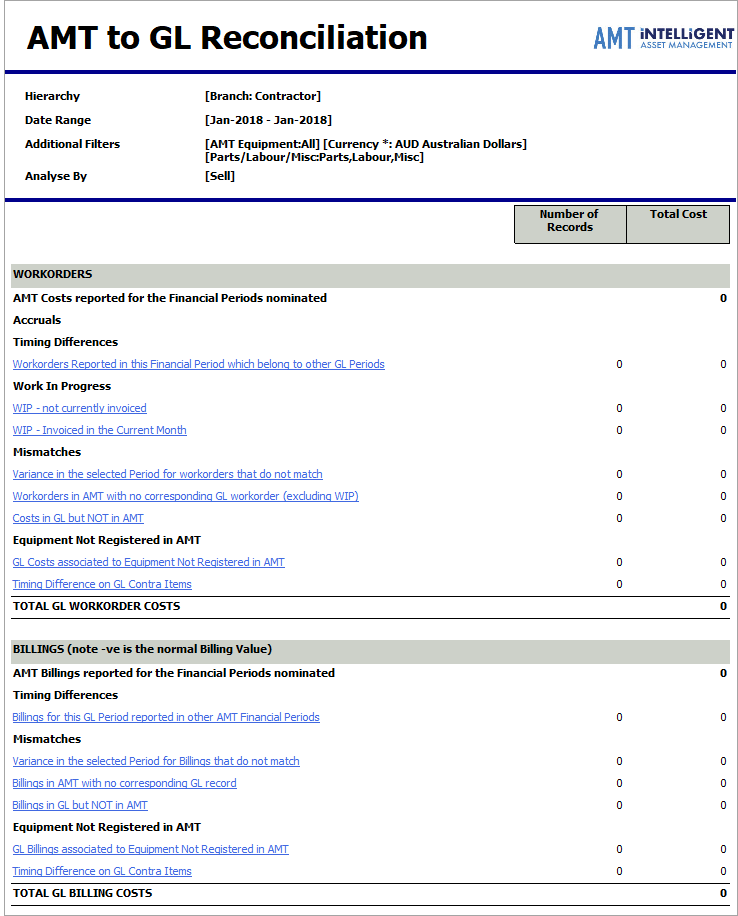
 Work orders
The work order section of the report first establishes the total work order settlement cost in AMT, and then through a series of analyses, determines the total cost in the GL. The end result should be a balance between AMT and GL.
AMT Costs reported for the Financial Periods nominated
This is based on the work order settlement history in AMT for the financial period selected.
If AMT has been configured to use transaction date reporting, the report uses the start date of children work order settlements to determine which work order settlement costs fall into the selected date range, and will never show a value in the Work In Progress fields. However, if non-transaction date reporting is used, the report uses the start date of the parent work order settlement (which is usually the job date, or the event actual down date for work order settlements linked to tasks which are linked to events).
If you are unsure whether transaction date reporting is enabled, contract your AMT Administrator.
The decision to enable this type of reporting is dependent on the nature of the work order settlement process.
Important rules for recognising and categorising work order settlement costs:
- Work order settlements and billings manually reconciled using the Set GL Reconciling Items function are not included in this report.
- If the work order settlement number in AMT is linked to several assets, these records will go to the match area if the costs match to GL records.
- If one or more segments of a work order settlement do not link to an asset, the work order settlement will go to mismatch even though the work order settlement’s total costs may match to GL.
- If one work order settlement in a group Parent/Child work order settlements in AMT is closed, all work order settlements in the group are considered to be closed.
- If an open work order settlement in AMT has records in the GL, it is considered to be closed.
Timing Differences
This section of the report identifies work order settlements reported in the current financial period that belong to other GL periods.
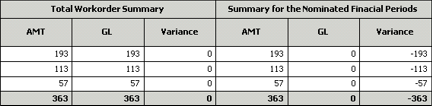
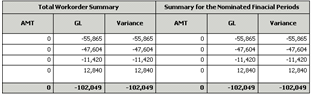
In the example above, while the AMT work order settlement and GL totals balance (Total Work Order Summary Variance = 0), the totals do not balance for the specific financial period (the report filter’s date range). The GL records fall into a different period to that of the work order settlement in AMT.
Work In Progress (WIP)
WIP - Not currently invoiced shows work order settlements which are open in AMT but the GL does not have records for this work order settlement number.
WIP - Invoiced in the current month - shows work order settlements closed in the current month that do not have corresponding records in GL data.
Mismatches
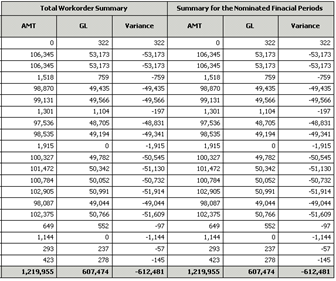
Variance in the selected Period for Work orders that do not match lists work order settlements which have an amount different to their corresponding GL record in the same financial period.
See the example below.
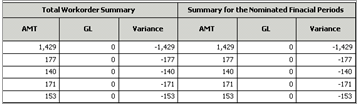
Work orders in AMT with no corresponding GL work order (excluding WIP) shows a list of work order settlements but no GL values.
Cost in GL but NOT in AMT lists all GL records for the current financial period which do not have a corresponding work order settlement in AMT (considering all financial periods).

Equipment not Registered in AMT
GL Costs associated to Equipment not registered in AMT shows AMT work order settlements that cannot be linked to the real equipment, but have corresponding records in the GL.
The possible combinations shown in this report are:
-
Work order settlement matches the GL record, but the work order settlement is not linked to an equipment in AMT.
-
Work order settlement mismatches the GL record, but the work order settlement is not linked to an equipment in AMT.
-
In AMT but no GL record, and the work order settlement is not linked to an equipment in AMT.
-
In the GL but not AMT, and the work order settlement is not linked to an equipment in AMT.
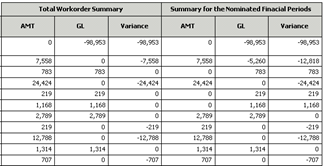
Timing Difference on GL Contract Items
Shows manually reconciled items for the selected period.
Billings
This section of the report is only relevant to maintenance contract equipment.
A negative billing value represents a normal billing amount.
AMT Billings Reported for the Financial Period
This figure is based on the billing history in AMT for the financial period selected. This value can be reconciled to the Billings Interrogation report.
Timing Differences
Billings recorded in this financial period reported in other AMT Financial Periods lists matches by invoice number. This sub-report includes all billings from the GL which can be linked or not linked to an AMT equipment.
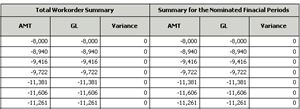
If there are multiple assets for an invoice, the Invoice column will show the value Mixed.
Mismatches
Variance in the selected period for billings that do not match shows mismatching billing amounts for the same invoices.
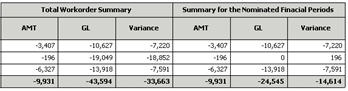
Billings in AMT with no corresponding GL records shows AMT billings grouped by invoice number which do not have corresponding billing records in the GL.
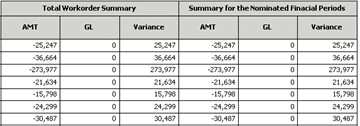
Billings in GL but NOT in AMT shows GL records which are linked to the real equipment but do not have a matching invoice number in AMT.

Equipment Not Registered in AMT
GL Billings associated to equipment not registered in AMT shows GL records which are not linked to the real equipment and do not have the matching invoice number in AMT.
Timing Difference on GL Contract Items
Shows manually reconciled items for the selected period.